
10 Critical Steps For Getting Real Business Results from Google Analytics at Your Local Dealership
Douglas Karr March 2, 2026

About once a week, I get an email from a local dealer or even their high-priced marketing agency with a single, declarative question:
Why is traffic down?
(Hint: It’s not)
I review conversions… up, time on site… up, events… up, local traffic… up. I dig a little deeper and eventually see what the client is seeing. They opened GA4 and see that the numbers are trending downward. What they didn’t see is that this is ghostbot traffic originating from Asia. All of the traffic is simultaneous, visits are happening all day and all night, and each visit is ending in under a few seconds. It started dissipating about a week ago. so technically, traffic appears down…
With a little bit of digging, though, they would see that traffic is actually up.
The downward facing chart is the check engine light of digital marketing. Most people don’t bother to even troubleshoot it. They look at a line on a chart and panic. The truth is, traffic is a vanity metric. If 1,000 bots from across the country hit your site, your traffic is up, but you haven’t sold a single vehicle.
Even a check engine light requires a diagnosis to identify whether or not there’s an issue. The same for GA4 charts. To get real business results from GA4, you have to stop looking at it as a scoreboard and start using it as a diagnostic tool.
Here are the 10 things you need to do to stop guessing and start selling.
Phase 1: The Essential GA4 Setup
Before you look at a single report, you must ensure your GA4 property is configured to think like a car dealership, not a generic blog. If this foundation is weak, your reports are lying to you.
1. Maximize Your Data Retention Window
By default, GA4 only retains user-level and event-level data for 2 months. You must log in today and change this setting to 14 months.
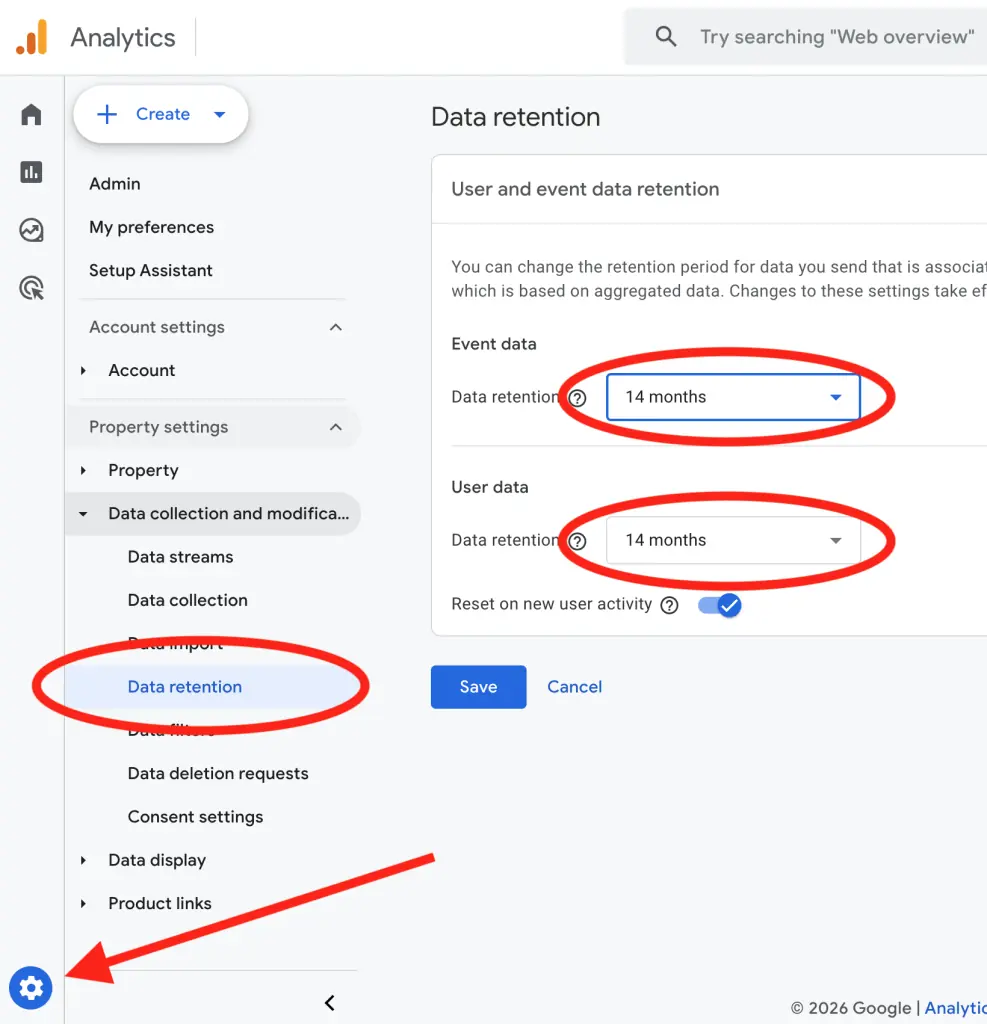
Car buying cycles are long, and your business is deeply seasonal. Did you sell fewer SUVs in October because your marketing failed, or simply because October is always slow for your region? If you only have 2 months of data, you can’t compare October 2026 vs. October 2025. You lose all seasonal context. In Admin > Data Settings > Data Retention, change the drop-down to 14 months.
2. Implement Mandatory UTM Campaign Tagging
A UTM (Urchin Tracking Module) is a simple snippet of code (querystring) attached to the end of a URL that tells GA4 exactly where a visitor came from. Without them, GA4 often guesses—lumping your high-priced Facebook ads, email newsletters, and third-party listing sites into generic categories like Organic Social or Referral.
Why this is critical for attribution: Attribution is the art of giving credit to the marketing effort that actually drove the lead. If you are running a Summer Service Special via email and a Truck Month campaign on Facebook, UTMs allow you to see exactly which one resulted in a service booking or a VDP view. By using specific tags like utm_source, utm_medium, and utm_campaign, you stop looking at social media“as a whole and start seeing which specific ad creative or offer is actually putting people in your showroom. It turns I think this is working into I know this is working.
3. Define and Set Up Your Key Events
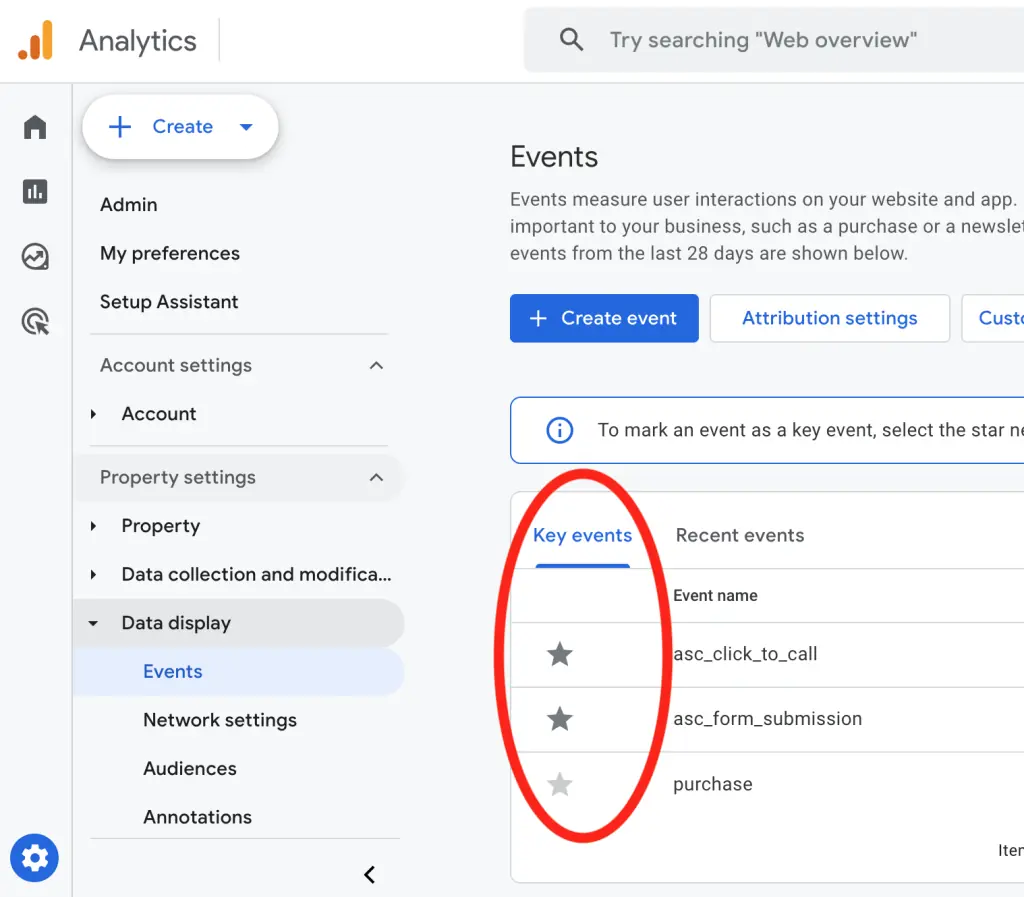
In GA4, we don’t track Conversions—we track Key Events. A user viewing your homepage is not a win. A win is a distinct action with high intent. You must configure Key Events for specific actions: submit_trade_in_form, confirm_test_drive, view_VDP, and click_to_call_service. This separates the casual browsers from the serious buyers who are ready to sign.
Phase 2: Actionable Reporting
Once your setup is accurate, you need to pull reports that provide immediate, operational insight. If a report doesn’t make you want to either turn an ad campaign off or double its budget, it’s just noise.
4. Implement Regional Data Filtering
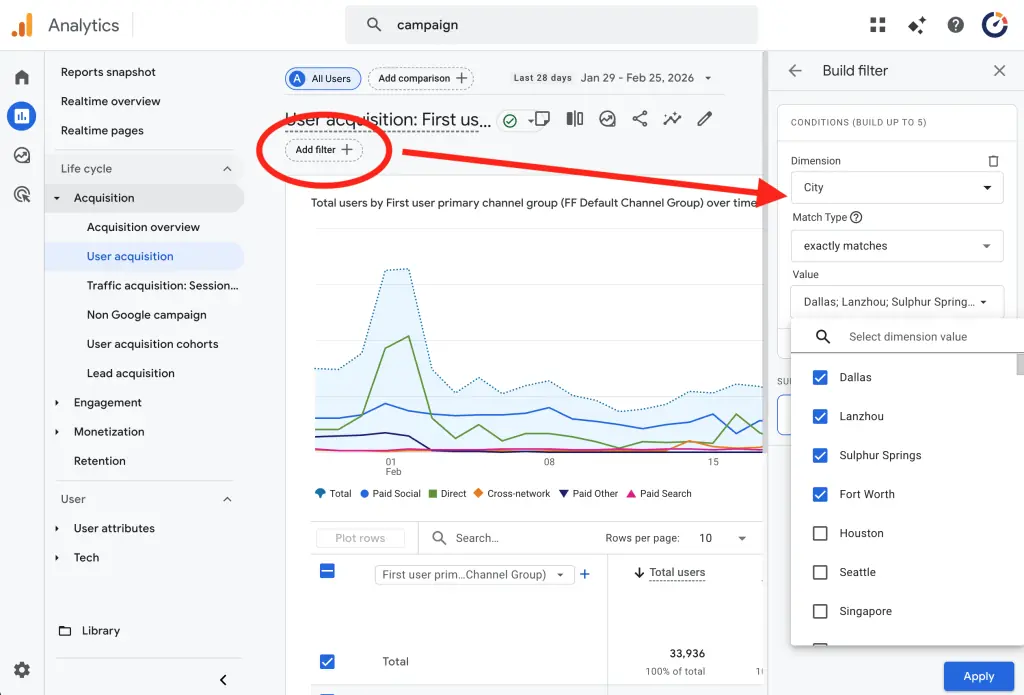
Analyze where your traffic is actually coming from. Use data filters to isolate your specific regions or cities. You are a local dealership. A user 500 miles away might love your inventory, but they aren’t coming in for an oil change. Global bot traffic or national clicks inflate your numbers but dilute your true conversion rates. Know your local performance by filtering for Geography in your reports.
5. Focus on Active and Engaged Users
Total users is a vanity metric that often leads to the why is traffic down panic. In GA4, the numbers that actually matter for your dealership are Active Users and Engaged Sessions. An active user is essentially any user who has an engaged session—meaning they stayed on your site for at least 10 seconds, viewed two or more pages (like moving from the home page to a specific VDP), or triggered a Key Event.
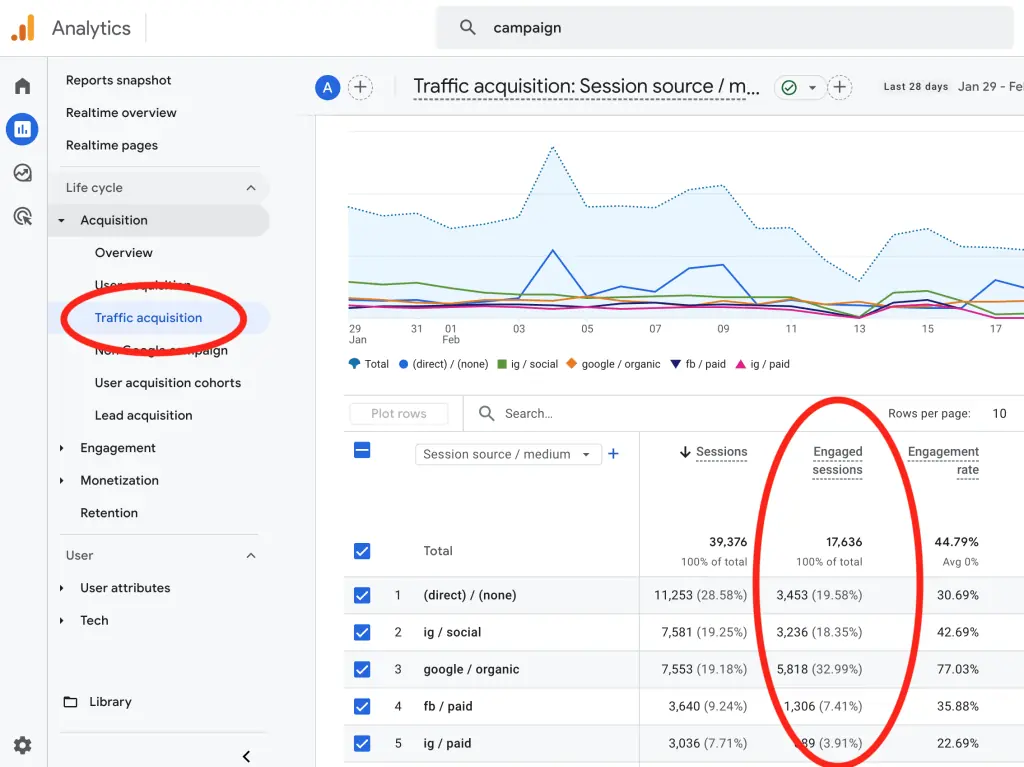
When you look at your reports, you might see a massive Total Users count, but if your Engaged sessions per active user is low (for example, 0.53), it means a large portion of your traffic is bouncing before they even finish reading your dealership’s name. This is the only number that matters when you’re measuring the health of your digital showroom.
6. Perform Mandatory Year-over-Year (YoY) Analysis
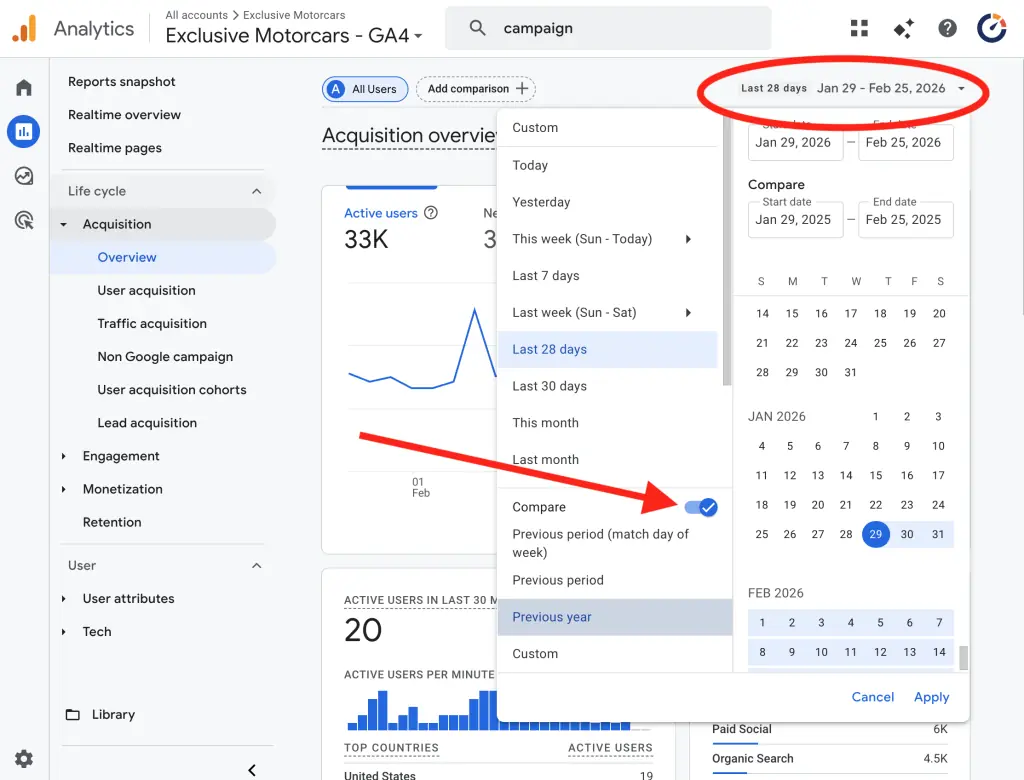
Every key metric must be analyzed with a YoY date comparison, not just the previous month. Looking at September vs. August is often useless in automotive. However, comparing October 2026 vs. October 2025 (during “Truck Month”) gives you true growth or decline context. This is how you spot real trends and know if your year-over-year strategy is actually moving the needle.
7. Analyze Your Traffic Deeply by Campaign
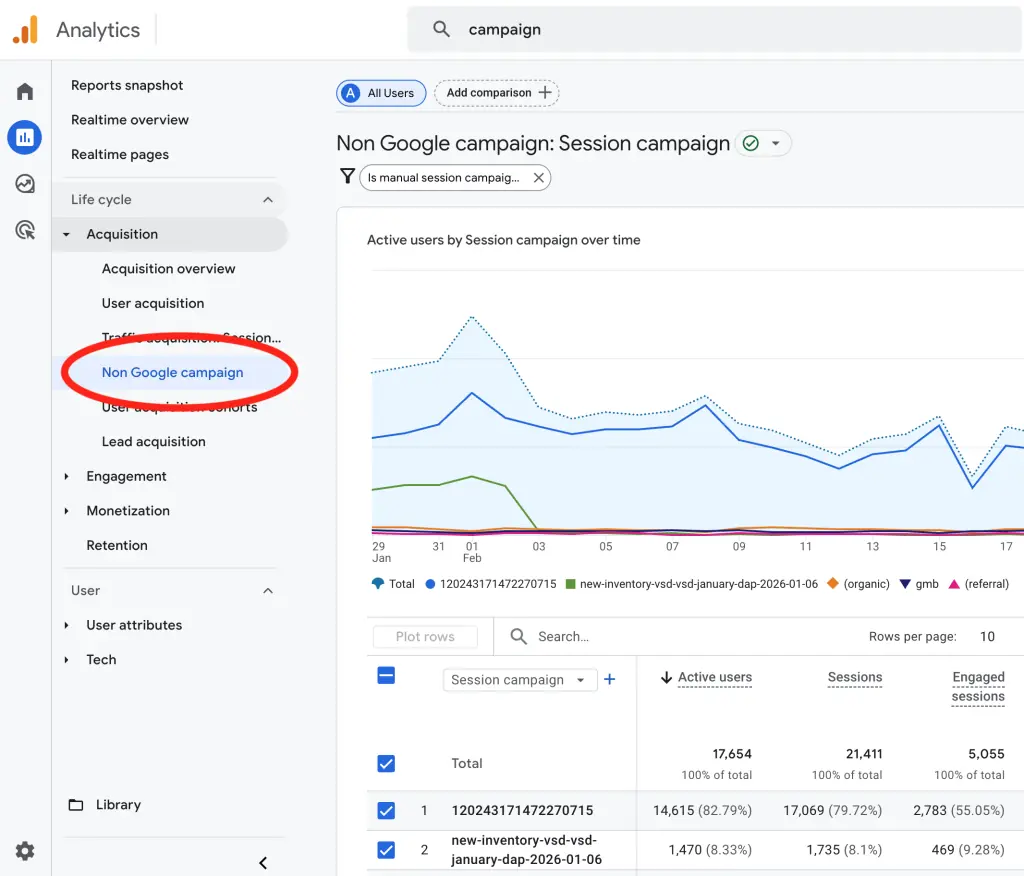
Instead of just looking at “Google Ads” vs. “Facebook Ads,” drill down using your custom UTMs to see specific campaign performance (e.g., october_truck_month_leads). This is how you calculate true ROI. Which specific ad creative or offer is driving the lowest cost-per-trade-in lead? When you see which specific campaign is winning, you can shift your budget in real-time to maximize results.
Phase 3: Analysis and Outcomes
This final phase uses modern GA4 metrics to troubleshoot why your campaigns are working or failing.
8. Use Engagement Rate
The old Bounce Rate is dead. In GA4, Engagement Rate tells you the quality of your traffic. If your Pre-Owned Financing landing page has a low Engagement Rate (below 50%), your traffic sources are poor or your page isn’t providing the information buyers want. This metric tells you if you are attracting qualified prospects or just digital window shoppers.
9. Measure Average Engagement Time
The old Time on Site was notoriously inaccurate. GA4 uses Average Engagement Time, which only counts the time your website was the active tab on the user’s screen. This is the most honest way to measure actual consumer attention. If your 2026 Model Review shows an average engagement time of only 12 seconds, your content isn’t being read—it’s being ignored.
10. Run a Path Exploration
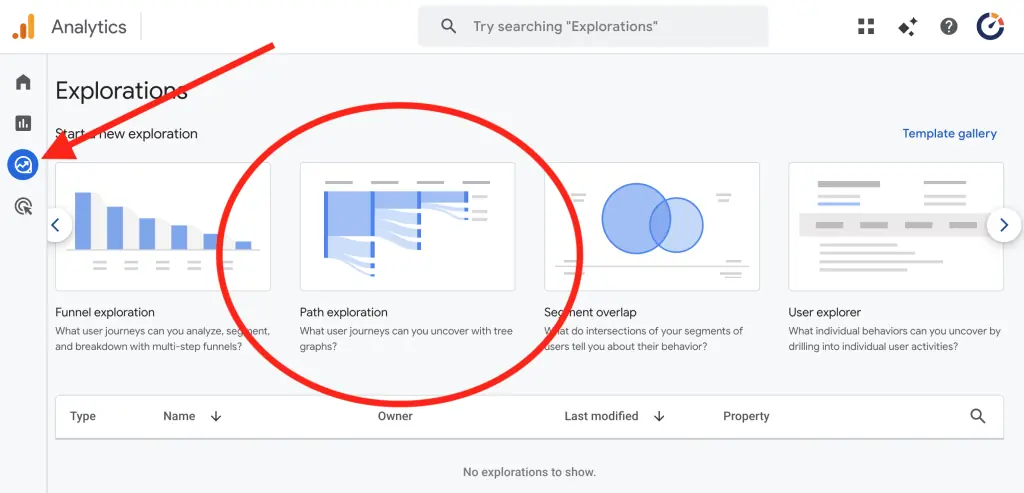
Stop guessing why people are leaving your trade-in form. Use the Path Exploration tool in the Explore tab to see the Forward Path from your critical pages. Instead of just seeing an exit, you can see the very last event they triggered before leaving. Did they get stuck on a specific form field? Did they click an external link? This turns a “dead end” metric into a troubleshooting tool to fix your sales funnel.
Conclusion
The next time you—or your agency—feel the urge to ask Why is traffic down?, stop. That is the wrong way to analyze your data.
To actually run a dealership, you need a methodology that works backward, not forward. Stop starting with the big, noisy Total Users number and hoping it trickles down to a sale. Instead, start at the finish line:
- Start with your Sales: Are you moving more inventory than you were this time last year?
- Now check your Key Events: Are your lead forms and call pings up or down YoY? Events are leading indicators to sales.
- Move to Engagement: If leads are down, is it because your Engagement Rate and Time on Site dropped, meaning the content isn’t sticking or there’s a problem with the site?
- End with Traffic: Only now do you look at the source. Is local traffic down this month in comparison to last month? Which specific campaigns or traffic sources stopped delivering those engaged users?
When you work from the outcome backward to the source, you find the why instantly.
Unfortunately, GA4 was never designed to be this usable or intuitive for a busy Dealer or GM. It’s a platform built for data analysts, not for people trying to hit a monthly sales quota. That’s exactly why the Overfuel dashboard continues to be optimized and improved. We’ve stripped away the fluff to give dealers a direct look at real business results, identifying exactly where your leads are coming from without making you hunt through a haystack of reports to find the needle.
